Hand-arm vibration monitoring, from first scan to end of day.
Toolminder times real tool use to the minute, converts it into HSE exposure points from each tool's vibration magnitude, and warns operators in the app before the EAV or ELV is breached. Every point traces back to a specific tool, operator and time.
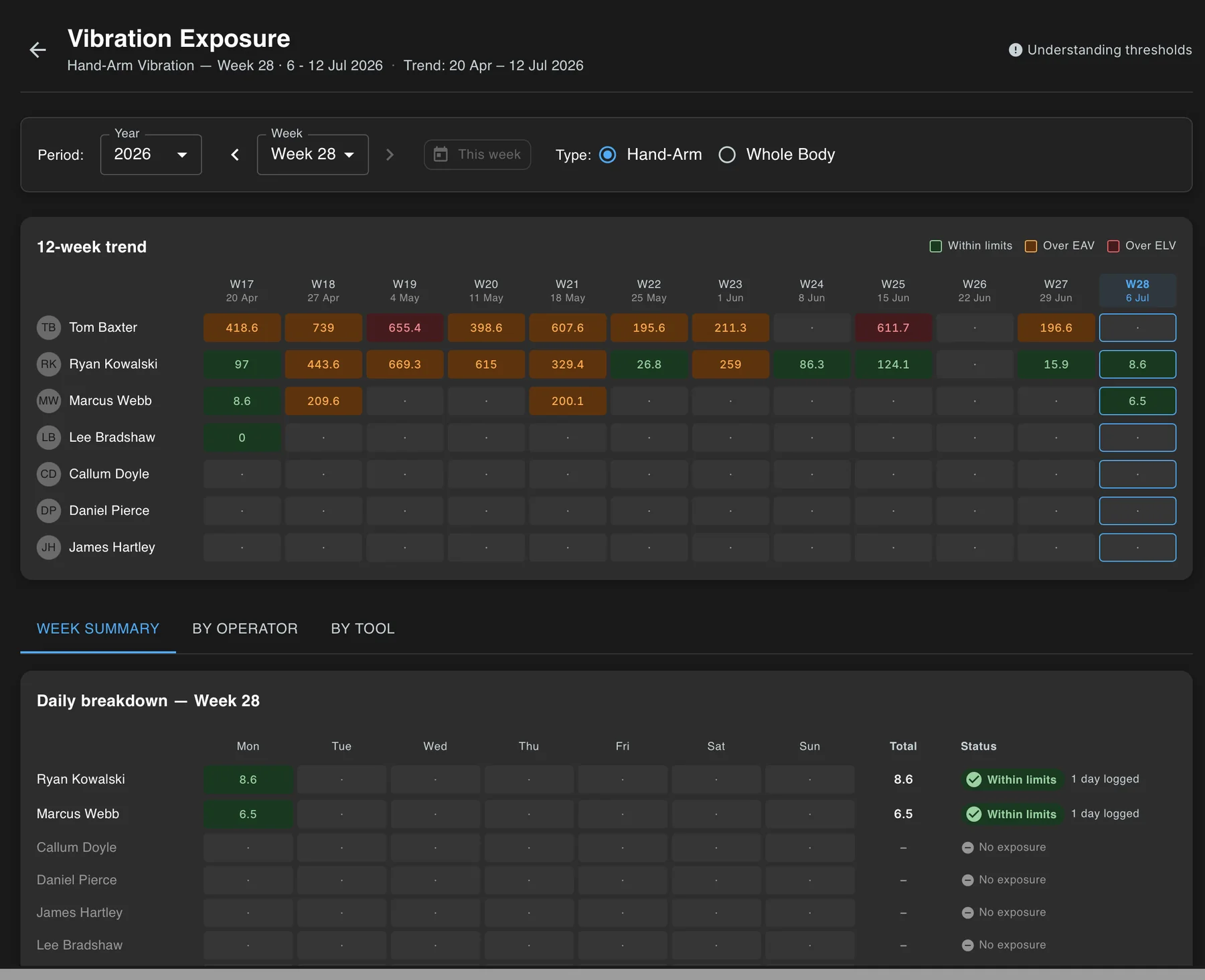
Green within limits, orange past the Exposure Action Value, red past the Exposure Limit Value. It's the same colour logic every operator, supervisor and report shares.
How it works
The working day, timed at the tool.
HAV monitoring isn't a separate job in Toolminder. It rides on the scan operators already do before picking up a tool when performing a Pre-use checks.
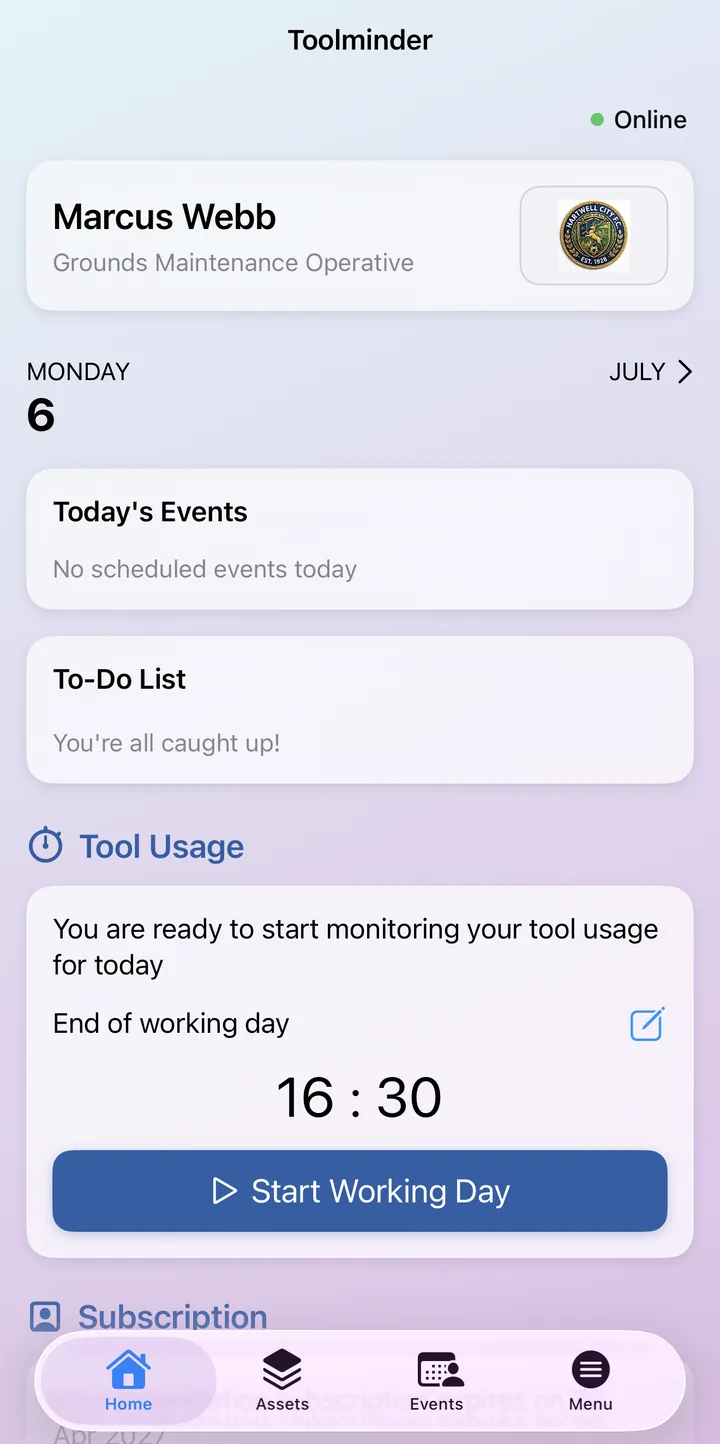
Start the working day
One tap in the app opens the operator's daily log and switches exposure tracking on. If end-of-day monitoring is enabled, their usual finish time is pre-set and adjustable.
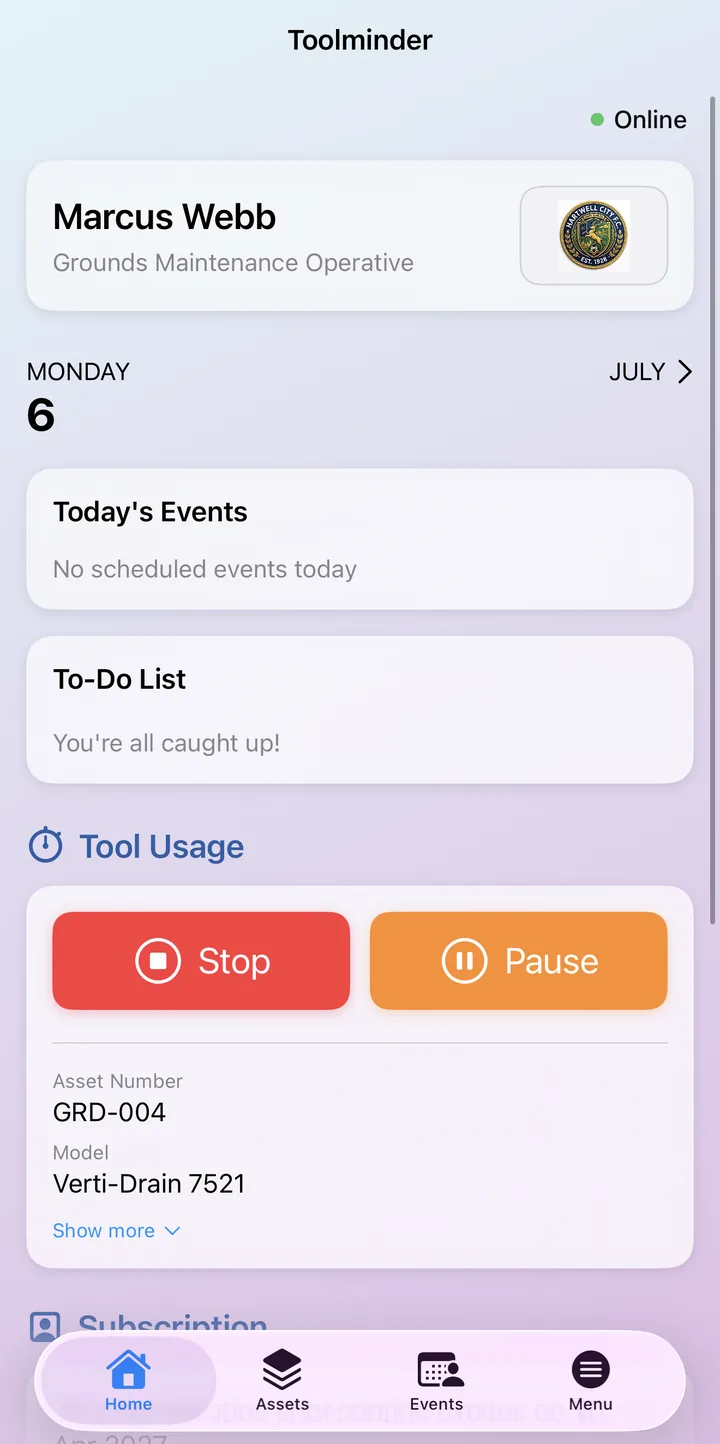
Scan before you start
Tap the tool's RFID or NFC tag, or scan its barcode. Toolminder shows the asset's vibration magnitude and status first. A tool with a failed inspection or failed check is refused, and if a pre-use check is due, it's completed before timing begins.
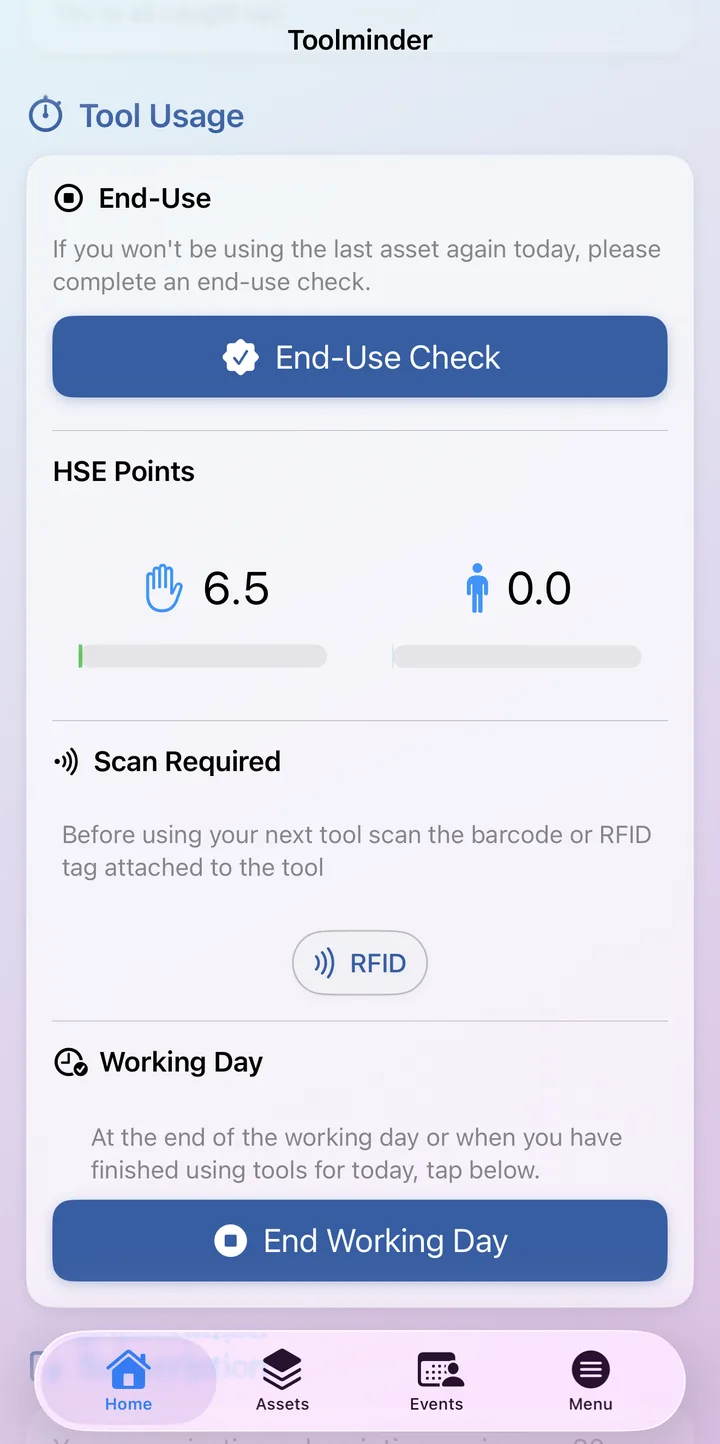
Points count themselves
Trigger time is recorded live and converted into HSE exposure points from the tool's vibration data. Breaks are paused, and partial minutes always round up, so short bursts of high vibration are never under-reported.
Amber before it's a problem
The operator's exposure bars turn orange at the EAV and red at the ELV, with a pulsing on-screen label the moment either is exceeded. Ending the day confirms an audit-ready exposure record.
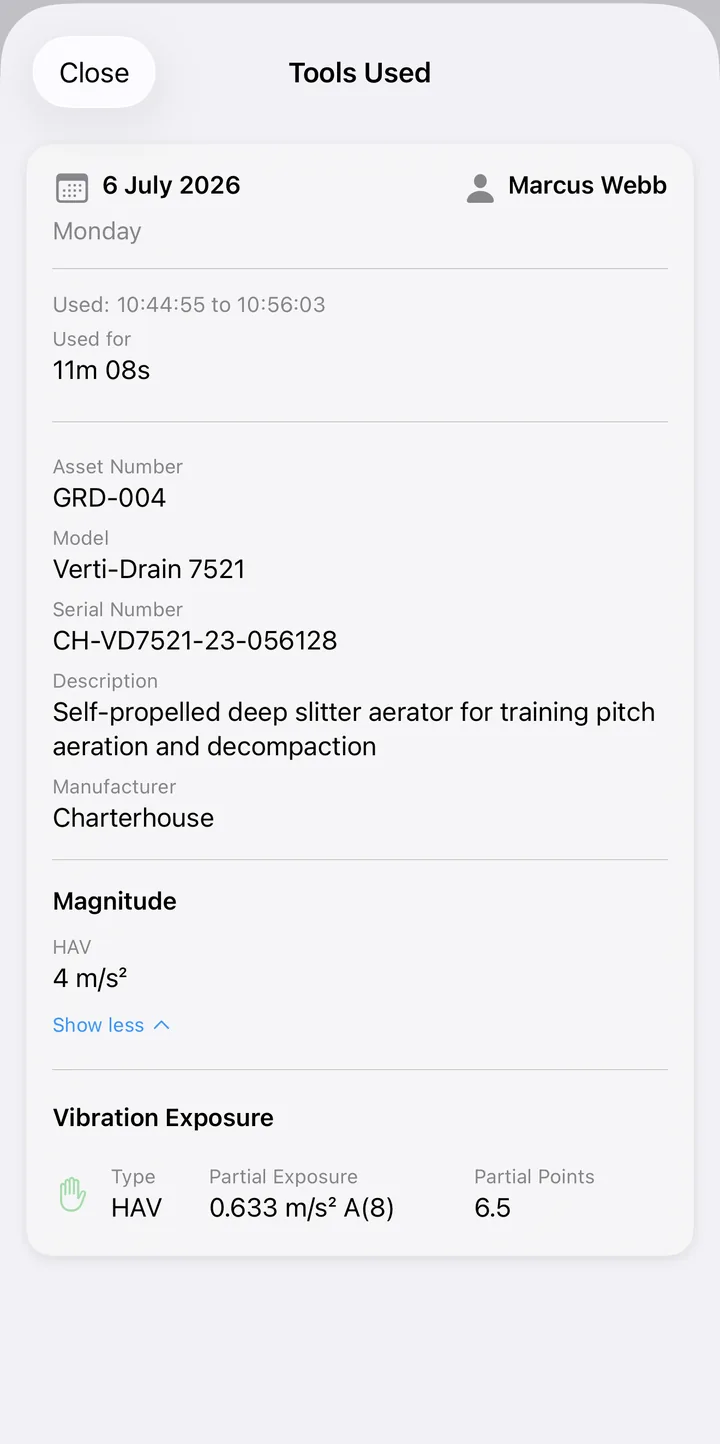
A day's exposure, screen by screen
The whole team, live.
Operators see their own day. Supervisors and administrators see everyone's: as it happens on site, and as a twelve-week picture in the portal.
Live sessions, live gaps
The Active view shows every tool session in progress across the organisation right now. The Today view flags any operator who hasn't scanned in yet, so missing records get caught at the start of the shift, not at the audit.
Drill into any day
Tap an operator's day to see every session behind the total: which asset, when, for how long, and the points it added. Nothing is a mystery number.
Trends that name the tool
The portal charts twelve weeks of exposure per operator and breaks each week down by day and by tool, so a rogue, high-vibration tool shows up in the data long before it shows up in a health record.
Limits that fit the person
Where occupational health advises a lower threshold (Raynaud's, carpal tunnel, previous HAVS symptoms), set a custom limit on that operator's profile. Their alerts start at their level, not just the standard EAV and ELV.
Why Toolminder
One scan. One record. No extra kit.
Standalone HAV systems add another device to the day. Toolminder builds vibration monitoring into the asset management, pre-use checks and compliance records you run anyway.
Nothing new to wear or charge
HAV monitoring runs on the phones operators already carry and the tags already on the tools. There are no wearables or dosimeters to issue, charge, calibrate or lose.
Vibration data lives on the asset
Every tool carries its own vibration magnitude in its asset record. Scan a tool with no data and the app warns you before use, so gaps in the register get found and fixed.
Records built for the audit
Every entry carries the tool, the operator, the timestamp and the duration behind it, and exposure history sits beside pre-use checks, inspections and service history in one asset record.
Built around the Control of Vibration at Work Regulations 2005.
EAV · Exposure Action Value
2.5 m/s² A(8)= 100 points
The daily level at which employers must act to reduce exposure.
ELV · Exposure Limit Value
5.0 m/s² A(8)= 400 points
The legal daily maximum that must not be exceeded.
Whole-body vibration is tracked alongside HAV with its own thresholds: EAV 0.5 and ELV 1.15 m/s² A(8).
Go deeper
The thresholds, the health risks and the record-keeping rules, explained in plain English.
Ready to see it in action?
Book a walkthrough with the team, or download the app and take a look around.