One record per asset. The whole story.
Toolminder keeps a live register of every tool and machine you own: its identity, its documents, its checks, its service history and its vibration data, built from the scans your team already does rather than paperwork done later.
What the record holds
How it works
A register kept true by the work itself.
Most asset lists decay the day they're written. Toolminder's register is maintained by the scans, checks and jobs your team does anyway, so it stays accurate without anyone "doing the admin".
A register that stays true
Every asset lives in Toolminder with its details, documents and vibration magnitude. The tag on the machine and the record in the system are one and the same, so the register reflects the fleet as it actually is, not as a spreadsheet remembers it.
A history that writes itself
Pre-use checks, timed usage, end-use checks, failures, service jobs and observations are recorded at the tool, as work happens. Each asset carries its whole working life in order, with nothing kept on paper or typed up later.
Evidence an auditor can follow
Every check is timestamped and named, every failure is tracked through to resolution, and every record proves it was made at the machine. When PUWER or an HSE inspector asks, the trail is already there.
Oversight without hovering
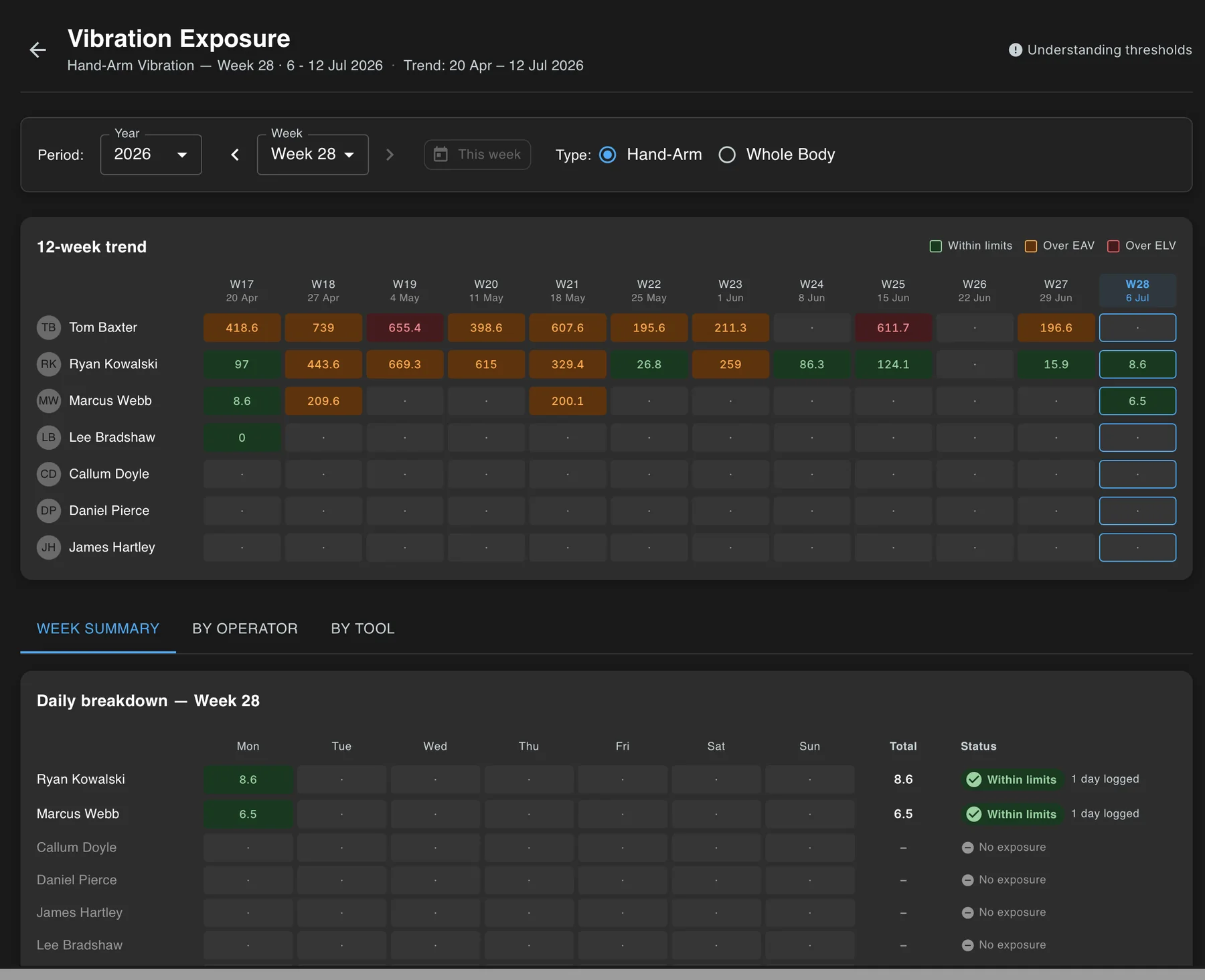
The portal shows live sessions across the organisation, flags operators who haven't scanned in at the start of a shift, and charts twelve weeks of exposure per operator, broken down by day and by tool.
In the portal
Trends that name the tool.
Twelve weeks of exposure per operator, broken down by day and by tool, so a rogue, high-vibration machine shows up in the data long before it shows up in a health record. Live sessions and missing scans surface the same way: at the start of the shift, not at the audit.
Compliance as a by-product of the day's work.
PUWER 1998
The Provision and Use of Work Equipment Regulations put the duty on employers to keep equipment suitable, safe and maintained. Toolminder turns that duty into a per-asset record of checks, defects and repairs.
Control of Vibration at Work 2005
Daily hand-arm vibration exposure is tracked as HSE points from real trigger time, with alerts as operators approach the exposure action and limit values, recorded per person, per tool, per day.
Control of Noise at Work 2005
Noise sits alongside vibration in the same system, and Earlsmere's on-site testing service can measure both, so the data behind your records comes from the machines you actually run.
The pieces
One system, not a stack of apps.
Tool tracking
RFID, NFC and barcode identification with the phones your team already carry: the scan that keeps every record honest.
See tool trackingPre-use checks
Your checklists, completed at the machine with photos and sign-off, gating tools that aren't safe to run.
See how checks workHAV monitoring
Real trigger time converted into HSE exposure points, with alerts before the action and limit values are breached.
See HAV monitoringFAQ
Asset management, asked and answered.
What counts as an asset in Toolminder?
Anything you can tag: power tools, breakers, mowers, chainsaws, plant, workshop machines and the equipment in between. Toolminder is used across construction, engineering, grounds maintenance, facilities management, sports grounds and local authorities in the UK.
How is this different from an asset spreadsheet?
A spreadsheet describes assets; Toolminder proves them. Records are created at the machine by scanning its tag, so every entry is timestamped, named and tied to physical presence. The register can't quietly drift away from reality, because the day's work is what keeps it up to date.
Does Toolminder handle servicing and repairs?
When a check fails, the operator gives a reason and photos and can raise a service job on the spot, assigned to a person with a priority. The tool is refused at the next scan until a new check passes, and the job joins the asset's permanent history.
How checks raise jobsWhat evidence do we get for a PUWER or HSE audit?
A chronological history per asset: pre-use and end-use checks with photos and signatures, usage sessions, exposure points, defects and the jobs that resolved them. Supervisors see the same records live in the portal, so audit day is a filter, not a scramble.
Does it cover vibration and noise compliance too?
Yes. Hand-arm vibration monitoring is built into the same scan operators already do, converting trigger time into HSE exposure points with alerts at the action and limit values. Earlsmere also provides on-site HAV, WBV and noise testing to put accurate data behind every record.
See HAV monitoringReady to see it in action?
Book a walkthrough with the team, or download the app and take a look around.